Serverless in My Homelab, On-Demand Consumption
My homelab has a Mac mini M4 and 5 mini PCs, 2 of them running 24/7. The others hibernate and wake up on demand

Context
In a homelab, we often want everything running all the time: a Proxmox cluster with several nodes, a Kubernetes cluster, containers for small services. We end up with noise, heat, and an electricity bill that climbs quickly for services we rarely use.
In a house, to reduce the electricity bill and adopt more economical habits, occupants usually turn off the lights, unplug devices that don’t need power 24/7, and above all they don’t heat (in cold countries) or air-condition (in hot countries) an empty room.
Well, for a homelab we can apply the same idea: non-essential services hibernate by default, and wake up only when we need them.
Objective
In this article, you will learn:
- Why a Proxmox cluster needs a quorum (a majority vote) to stay alive, and how a microVM provides the votes of the powered-off servers to maintain it.
- How to power on a switched-off server with Wake-on-LAN, triggered from a Kubernetes cronjob.
- How KEDA scales down your Kubernetes applications and scales them back up when they receive an HTTP request, like cloud serverless functions such as AWS Lambda or Azure Functions.
- How DockerWakeUp does the same for classic containers (Podman or Docker).
- What it saves, and what it costs (because there is a price: the wait, known as the cold start).
The big picture
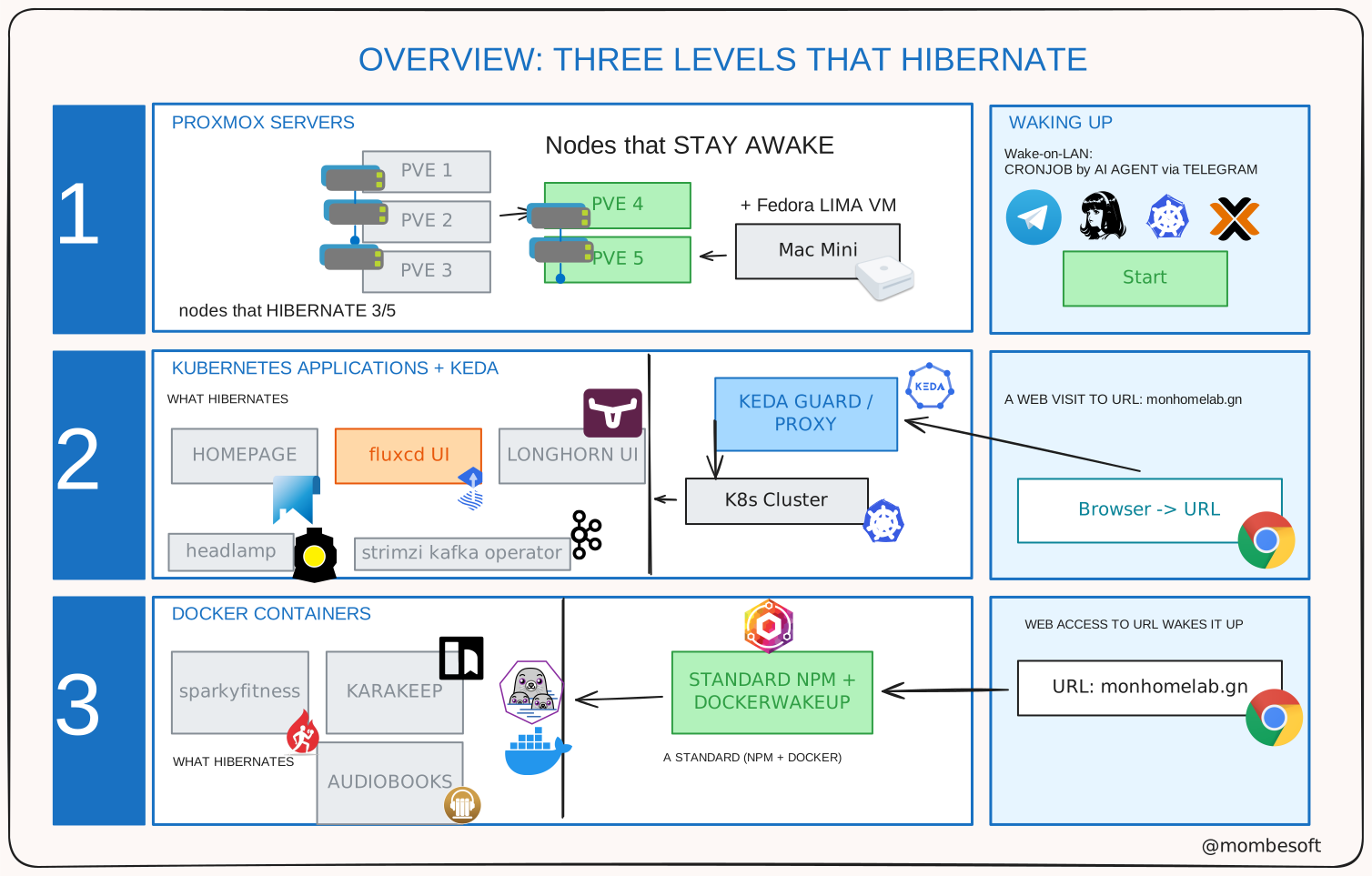
The common thread: the visitor sees no difference, apart from a few seconds of waiting on the first request. This delay is what we call the cold start, like a car that takes a few minutes to start on a cold winter morning.
Prerequisites
- Wake-on-LAN enabled on the Proxmox servers (in the BIOS and in the OS).
- A Proxmox cluster or physical machines (mine has 5 nodes, but the principle works with 2).
- A Kubernetes cluster with a gateway (Talos Linux + Cilium Gateway).
- A physical server or Linux VM host (Docker or Podman) with a reverse proxy (Nginx Proxy Manager or Traefik + DockerWakeUp).
- A KEDA controller with the http add-on installed on the Kubernetes cluster.
- A VM or physical machine to act as the QDevice (preferably outside the Proxmox cluster): a Linux microVM. Personally, I use Lima on a Mac mini, but it can be a Linux VM on a physical server, or even a Raspberry Pi.
I. Wake-on-LAN: two servers running 24/7 out of five, plus a QDevice
My homelab has 5 Proxmox servers, but only 2 run 24/7. The other 3 hibernate and wake up on demand. I power them on occasionally to test new features or run heavy compilations. The rest of the time, they hibernate to save energy.
Election: quorum means majority
The servers in a Proxmox cluster constantly monitor each other. To make a decision (starting a virtual machine, for example), it takes more than half of the votes: this is the quorum. Think of a board of directors: with 5 around the table, you need 3 votes to decide.
If I power off 3 of the 5 servers, only 2 remain: 2 votes out of 5, no majority, so the cluster freezes to protect itself (read-only mode). No new virtual machines can be created, and the ones that were powered off cannot be started.
Why do we need a QDevice?
Proxmox lets you add a QDevice: a tiny program that votes in place of the absent nodes. With a somewhat special setting, my QDevice provides 4 votes. Let’s do the math:
| Situation | Votes | Verdict |
|---|---|---|
| 5 servers + QDevice | 9 of 9 | The cluster decides |
| 2 servers + QDevice | 6 of 9 | The cluster still decides |
| 2 servers without QDevice | 2 of 5 | The cluster freezes |
The QDevice runs in a very small microVM (qdevice-vm) hosted on my Mac mini thanks to Lima (a tool that runs Linux virtual machines on Mac). It has a real address on my local network, bound to the ethernet port of its host, and does only one thing: vote. It uses barely 200m of CPU and 200 MB of RAM, and the Mac mini is very energy-efficient.
Adding a QDevice to a 5-node cluster is not officially supported by Proxmox: you have to force the setup with
pvecm qdevice setup --force. It works, but the Mac mini becomes critical: if it sleeps, the 2 remaining servers lose their majority and everything freezes. My Mac therefore never sleeps, thanks to a tool like Amphetamine. Setup guide for the QDevice: saturnme.com.
The key point: powering off and on the 3 servers never changes the membership list of the cluster.
Waking up a Proxmox server: Wake-on-LAN
A hibernating server isn’t really off: its network card stays listening. Wake-on-LAN consists of sending it a magic packet: a special network message containing its MAC address 16 times, and it powers on.
In the simplest possible version, using nothing but the Python standard library:
1
2
3
4
5
6
7
8
import socket

MAC = bytes.fromhex("e4b97afb0abf")  # MAC address of the sleeping server
packet = b"\xff" * 6 + MAC * 16  # 6 bytes of 0xFF, then the MAC 16 times

with socket.socket(socket.AF_INET, socket.SOCK_DGRAM) as s:
    s.setsockopt(socket.SOL_SOCKET, socket.SO_BROADCAST, 1)
    s.sendto(packet, ("192.168.x.255", 9))  # VLAN broadcast, port 9 (discard)
Run from my laptop, which is plugged into the same switch as the servers: it works. The network card recognizes its MAC address, wakes the motherboard, and a few dozen seconds later the server rejoins the cluster on its own.
Why go through the Proxmox API from Kubernetes?
I use Kubernetes cronjobs to wake up or hibernate the servers when I need them. But it doesn’t work: the magic packet never reaches the sleeping network card.
Two constraints collide:
- A sleeping network card has no IP address: it speaks neither TCP nor TLS, it only waits for a broadcast that travels over its cable. It’s impossible to “contact” it directly from outside the VLAN.
- A Kubernetes pod doesn’t live on that same cable: it’s on the cluster network (Cilium, dedicated VLAN, overlay). Its broadcasts are not propagated to the servers’ VLAN, and that’s a good thing from a security standpoint: a WoL broadcast crossing the whole network would let anyone wake servers on other VLANs.
As a result, my cronjob runs, the packet “leaves”, but the sleeping network card receives nothing. This is the classic limitation of Wake-on-LAN: the magic packet does not cross networks.
The solution is simple: pve1, a node in the Proxmox cluster, is already running 24/7 and is plugged into the same switch as the sleeping servers. So I tell it to send the broadcast itself, through its REST API. More details are in the Proxmox documentation: Wake-on-LAN via the API.
1
2
3
curl -sk -H "Authorization: PVE $PROXMOX_API_TOKEN" \
  https://<pve1>:8006/api2/json/nodes/pve3/wakeonlan \
  -X POST
In my case, a small Python CLI makes this curl call for me: homelab-automation proxmox wol --target-node pve3.
Proxmox builds the magic packet and sends it from its own network card, which is physically plugged in the right place.
II. Using KEDA to scale to zero on Kubernetes
For context, I have a Kubernetes cluster running on the Talos Linux distribution. It consists of 5 VMs (Kubernetes nodes) and runs on 3 Proxmox servers.
KEDA is an open-source project that autoscales applications based on events. It is especially useful for applications that aren’t used all the time, because it can scale the number of replicas down to zero when there’s no traffic, and bring them back up when requests arrive. For this we’ll use its HTTP add-on.
Choosing which applications to hibernate
My Kubernetes cluster runs tools I rarely open: controllers, operators, and dashboards or applications that aren’t used every day.
Ideally, I would turn them off completely, but by default Kubernetes can’t wake them up on its own when someone wants to use them. That’s where KEDA comes in.
I have cronjobs that wake up controllers from time to time to apply updates, but most of the time they stay asleep. When I want to use them, I wake them up with KEDA.
How it works:
The mechanism is like the entrance to a closed shop:
- You arrive at the door (you open the address my_super_app.com).
- The receptionist (a small proxy called the interceptor) greets you and asks you to wait.
- They call the salesperson: KEDA scales the application up.
- When it’s ready, the doorkeeper lets you in: your page appears.
Your first visit therefore takes a few seconds longer (the cold start), but it succeeds.
One simple rule, repeated everywhere
Every application that hibernates follows the same pattern, simply: “zero pods at rest, one is enough when people show up, and it goes back to sleep after 15 minutes without a visit”:
1
2
3
4
5
spec:
  scaledownPeriod: 900 # 15 minutes without a visit -> back to sleep
  replicas:
    min: 0 # zero pods when nobody comes
    max: 1 # one pod is enough for family use
You can adjust the sleep time to your liking, but 15 minutes is a good compromise: it leaves time to browse the application, and it doesn’t consume resources when nobody is using it.
III. Applying the same principle to classic containers (Podman/Docker)
The same doorkeeper, for small services running in Docker containers
Next to Kubernetes, I also have simple services running in containers. They’re often web apps, dashboards, or monitoring tools.
They used to run all the time, but I don’t use them every day. So I want them to hibernate too, and wake up on demand. That’s where DockerWakeUp comes in: it plays exactly the same role as the KEDA doorkeeper, but for classic containers.
How it works:
Technically, the mechanism is simple:
- NPM (Nginx Proxy Manager) receives the encrypted visits (HTTPS thanks to Let’s Encrypt) and forwards them to the wake-up proxy while keeping the requested name.
- The DockerWakeUp proxy looks at the requested name (
audiobookshelf) → it runspodman compose up -din/opt/audiobookshelf, then forwards the visit. - After 15 minutes without a visit (
idle_threshold: 900), it stops the service withpodman compose stop.
Each service is declared simply with its route name, its local address, its start command and its stop command:
1
2
3
4
- route: 'audiobookshelf'
  target: 'http://127.0.0.1:8080'
  startCommand: 'cd /opt/audiobookshelf && podman compose up -d'
  stopCommand: 'cd /opt/audiobookshelf && podman compose stop'
What it saves, honestly
What I gain:
- 3 servers powered off most of the time: less noise, less heat, a lighter electricity bill.
- The memory and CPU of the Kubernetes cluster freed up by several sleeping applications.
- Docker services that consume nothing when I’m not using them.
What it costs:
- A few seconds of waiting on the first request (cold start), at each stage: about 1 minute for a server, a few seconds for a pod or a container. But to be honest: this is a homelab whose main user is me, not a critical service for millions of users.
- Complexity: three doorkeepers to maintain, a Mac that must never sleep (it uses little power), BIOS settings not to forget.
- Accepted bets: a QDevice forced without official support.
Useful resources
- Proxmox: quorum with QDevice
- KEDA HTTP add-on
- DockerWakeUp
- Lima (Linux VMs on Mac)
- KEDA ScaledObject vs HTTPScaledObject
Conclusion
Serverless isn’t magic reserved for the cloud: it’s a discipline: don’t leave anything running without a reason, and know how to wake it up quickly. In my homelab, it applies at three scales: servers wake up through a magic packet, pods and Docker containers through HTTP visits. The always-on core runs on 2 servers, a mini-VM that votes, and three small doorkeepers that use barely any memory or CPU.